Currently Empty: ₹0.00




Motherboard
Motherboard computer का एक main hardware component है। यह एक बड़ी Printed Circuit Board (PCB) होती है, जिस पर computer के कई important components connect होते हैं।
Simple words में, Motherboard computer के different hardware components को आपस में connect और communicate करने के लिए platform provide करता है।
Motherboard का काम
Motherboard computer के components के बीच communication और data transfer में important role निभाता है।
इसके ऊपर या इसके साथ कई components connected होते हैं, जैसे:
- CPU
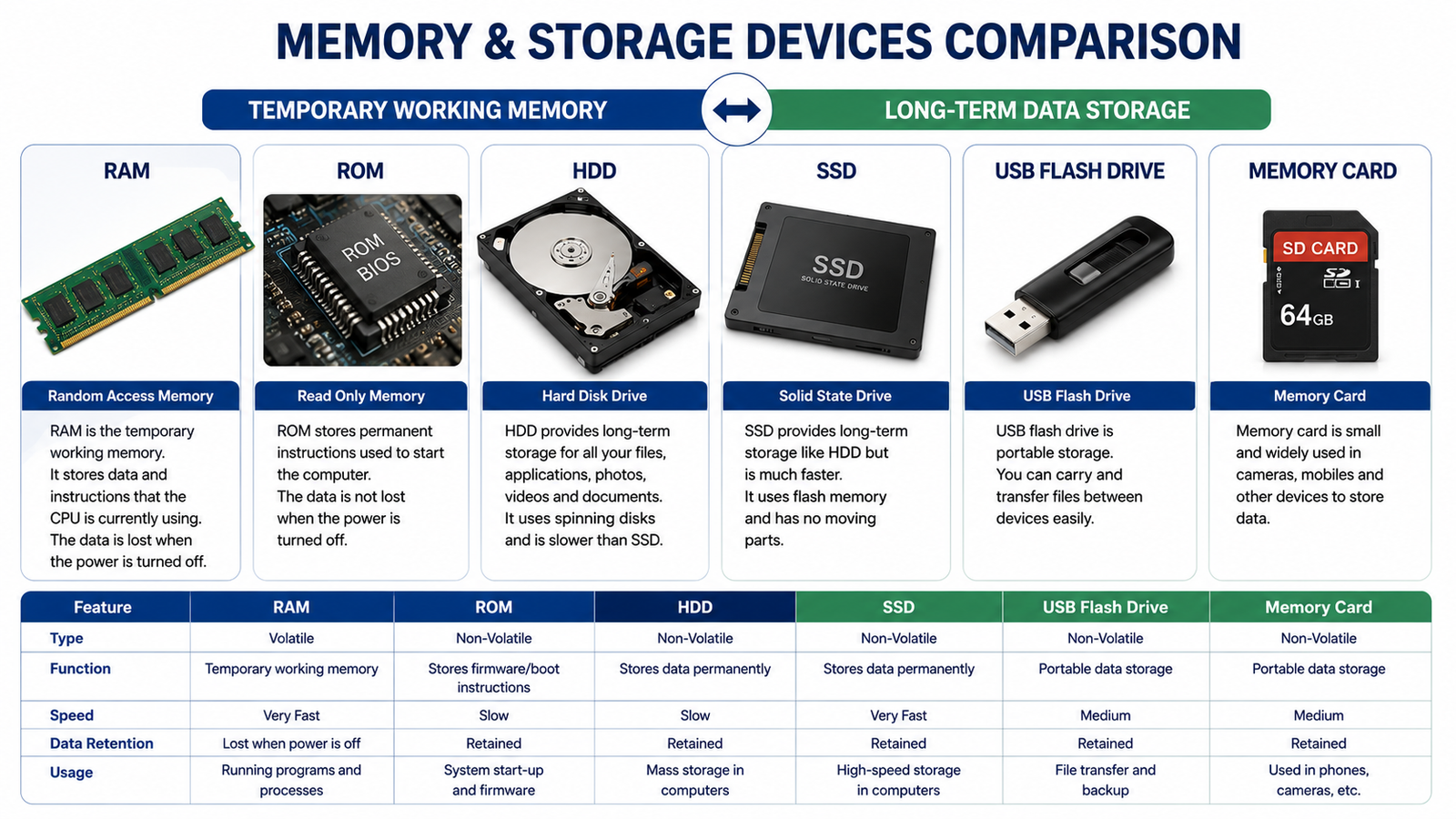
- RAM
- Storage devices
- Graphics card
- Network card
- USB devices
- Power supply connections
1. CPU Connection
Motherboard पर CPU के लिए एक CPU socket होता है। इसी socket में compatible processor install किया जाता है।
2. RAM Connection
Motherboard पर RAM slots होते हैं। इनमें RAM modules install किए जाते हैं।
RAM computer को programs और data को temporarily access करने में मदद करती है।
3. Storage Connection
Motherboard पर storage devices connect करने के लिए different interfaces उपलब्ध हो सकते हैं।
Examples:
- SATA
- M.2
इनके माध्यम से HDD, SATA SSD या compatible NVMe SSD connect किए जा सकते हैं।
4. Expansion Slots
Motherboard पर expansion cards लगाने के लिए slots होते हैं।
Example:
PCI Express (PCIe) slots का उपयोग graphics card और कुछ अन्य expansion cards के लिए किया जा सकता है।
5. USB Ports
Motherboard से connected USB ports के माध्यम से keyboard, mouse, pen drive, printer और अन्य USB devices connect किए जा सकते हैं।
6. Power Connections
Power Supply Unit (PSU) से motherboard को power देने के लिए अलग-अलग power connectors होते हैं।
Motherboard connected components को required power distribution में भी भूमिका निभाता है।
7. BIOS/UEFI
Motherboard में firmware होता है जिसे modern systems में आमतौर पर UEFI कहा जाता है। यह system startup के दौरान hardware initialization और boot process में important role निभाता है।
पुराने systems में BIOS firmware का उपयोग होता था।
8. Chipset
Motherboard का chipset processor और अन्य hardware components के बीच communication और platform features को support करता है।
Modern computers में chipset architecture processor और platform design के अनुसार अलग-अलग हो सकता है।
9. CMOS/RTC
Motherboard पर RTC (Real-Time Clock) और उससे संबंधित circuitry system time को maintain करने में मदद करती है। कई systems में इसके लिए battery backup भी होता है।
Motherboard के Important Parts
| Part | Function |
|---|---|
| CPU Socket | Processor install करने के लिए |
| RAM Slots | RAM install करने के लिए |
| PCIe Slots | Expansion cards के लिए |
| SATA Ports | SATA storage/devices के लिए |
| M.2 Slot | Compatible SSD/devices के लिए |
| USB Ports | USB devices connect करने के लिए |
| Power Connectors | Power connection के लिए |
| UEFI/BIOS Firmware | Startup और hardware initialization |
| Chipset | Platform communication/features |
| CMOS/RTC Battery | Clock और related settings support |
Motherboard क्यों Important है?
अगर motherboard न हो, तो computer के अलग-अलग hardware components को एक integrated system के रूप में connect करना possible नहीं होगा।
यह:
- Hardware components को connect करता है।
- Data communication को support करता है।
- Power distribution में मदद करता है।
- Expansion की सुविधा देता है।
- System startup और hardware initialization में important role निभाता है।
Simple Example
Computer के components को एक team की तरह समझें:
CPU → Processing
RAM → Temporary Working Memory
SSD → Storage
GPU → Graphics Processing
Motherboard → इन components को connect करने वाला main platform
Quick Revision
Motherboard एक मुख्य PCB है जो computer के CPU, RAM, storage, expansion cards और अन्य hardware components को connect करके उनके communication और operation को support करती है।
SNCEC PORTAL
Student & Website Links
Quick access to student services, courses, learning resources and SNCEC information.
Student Login
Access your student account
Student Registration
Create your student account
Student Dashboard
Manage your learning activities
Courses
Explore our job-oriented courses
All Courses List
View complete course catalog
Mock Tests & Quizzes
Practice and test your knowledge
Student Zone
Access student services and resources
Student Zone →Learning Portal
Access online learning resources
Open Portal →Knowledge Base
Access computer learning notes and knowledge resources
Open Knowledge Base →SNCEC Digital Seva
Access digital services and online assistance
Open Digital Seva →Instructor Registration
Join us as an instructor
Our Team
Meet our professional team
Contact Us
Get in touch with our team
Computer Shop
Computers, accessories & IT products
SNCEC Official Website
Shree Narayan Computers & Education Center