Currently Empty: ₹0.00




Input Devices
Introduction
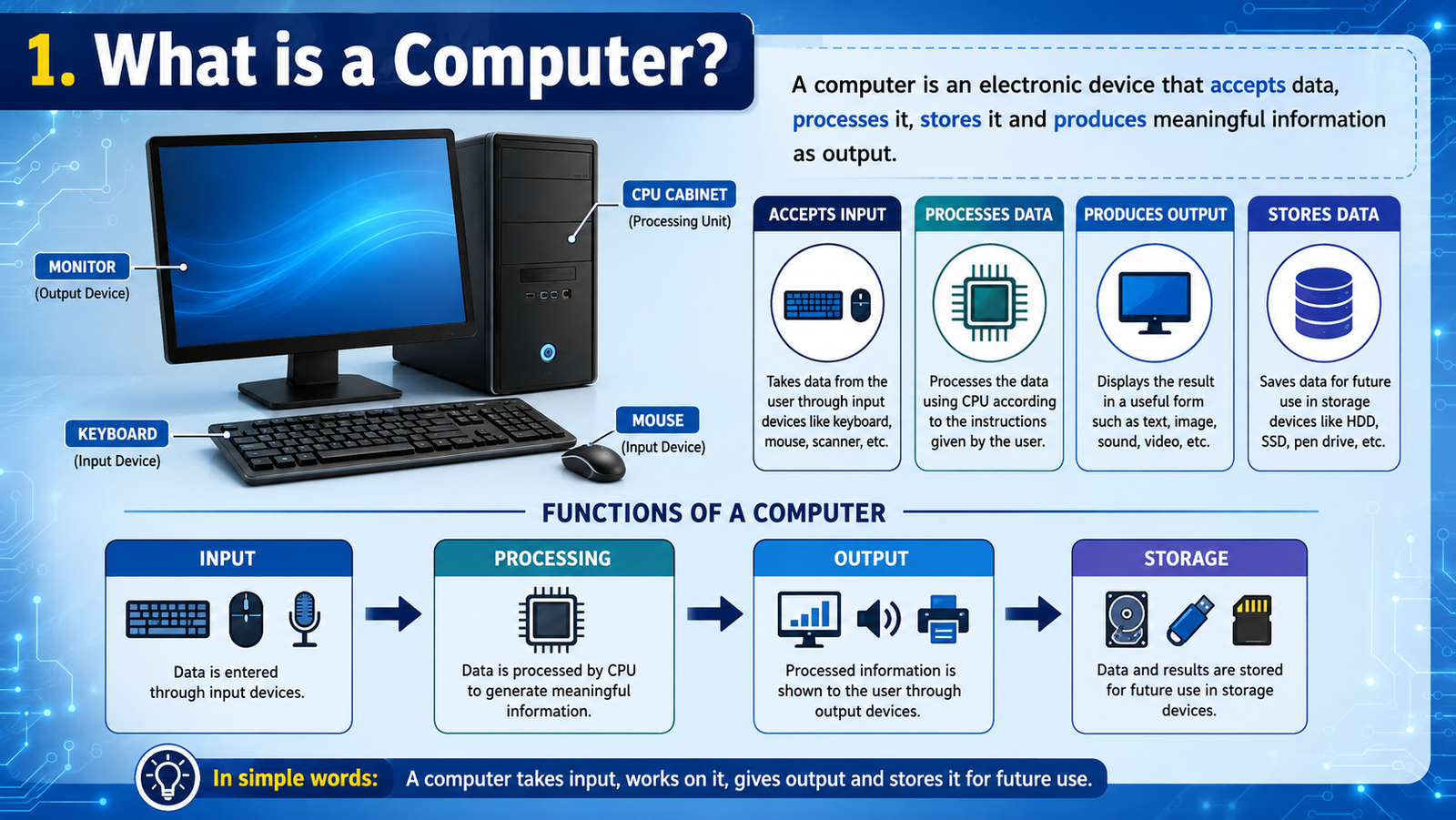
Computer को काम करने के लिए data और instructions की आवश्यकता होती है। Computer में data और instructions enter करने के लिए जिन devices का उपयोग किया जाता है, उन्हें Input Devices कहा जाता है।
सरल शब्दों में:
Input Device = Computer में Data या Instructions Enter करने वाला Device
उदाहरण के लिए, जब हम keyboard से अपना नाम type करते हैं, तो keyboard computer को input देता है।
Input क्या है?
Computer को दिया गया data या instruction Input कहलाता है।
उदाहरण:
यदि हम keyboard से RAM type करते हैं, तो RAM computer के लिए input है।
Input Device क्या है?
जिस hardware device की सहायता से computer में data, commands या instructions enter किए जाते हैं, उसे Input Device कहते हैं।
Common input devices:
- Keyboard
- Mouse
- Scanner
- Microphone
- Webcam
- Touchscreen
- Joystick
- Barcode Reader
- Biometric Scanner
1. Keyboard
Keyboard सबसे common input devices में से एक है।
इसका उपयोग:
- Text type करने
- Numbers enter करने
- Commands देने
- Keyboard shortcuts इस्तेमाल करने
के लिए किया जाता है।
Keyboard में अलग-अलग प्रकार की keys होती हैं:
- Alphabet Keys
- Number Keys
- Function Keys
- Control Keys
- Navigation Keys
- Special Keys
2. Mouse
Mouse एक pointing input device है।
इसका उपयोग screen पर pointer को control करने और objects को select करने के लिए किया जाता है।
Mouse के common operations:
- Click
- Double Click
- Right Click
- Drag and Drop
- Scroll
3. Scanner
Scanner किसी physical document या image को digital form में computer में लाने के लिए उपयोग किया जाता है।
उदाहरण:
किसी printed document को scan करके digital file बनाई जा सकती है।
4. Microphone
Microphone एक audio input device है।
इसका उपयोग आवाज या sound को computer में input करने के लिए किया जाता है।
उदाहरण:
- Voice recording
- Online meetings
- Voice commands
- Audio recording
5. Webcam
Webcam एक camera-based input device है।
इसका उपयोग computer में video input देने के लिए किया जाता है।
उदाहरण:
- Video calls
- Online classes
- Video conferences
- Live streaming
6. Touchscreen
Touchscreen एक display और input technology दोनों के रूप में काम कर सकता है।
User screen को touch करके commands और selections दे सकता है।
Examples:
- Smartphones
- Tablets
- ATMs
- Information kiosks
7. Joystick
Joystick एक pointing/control input device है।
इसका उपयोग मुख्य रूप से games और कुछ simulation systems में किया जाता है।
Joystick को move करके screen पर object या character को control किया जा सकता है।
8. Barcode Reader
Barcode Reader printed barcode को scan करके उसमें encoded information को computer system तक पहुँचाता है।
इसका उपयोग:
- Shops
- Supermarkets
- Warehouses
- Inventory management
में किया जाता है।
9. QR Code Scanner
QR Code Scanner QR code में मौजूद information को read करता है।
आज इसका उपयोग:
- Digital payments
- Website links
- Product information
- Event tickets
जैसे कार्यों में किया जाता है।
10. Biometric Scanner
Biometric devices किसी व्यक्ति की physical या behavioral characteristics को identify या verify करने में सहायता करते हैं।
Examples:
- Fingerprint Scanner
- Iris Scanner
- Face Recognition Camera
इनका उपयोग authentication और security systems में किया जा सकता है।
11. Card Reader
Card Reader memory cards या कुछ प्रकार के smart cards से information read करने के लिए उपयोग किया जाता है।
उदाहरण:
- Memory Card Reader
- Smart Card Reader
12. Graphics Tablet
Graphics Tablet का उपयोग drawing और digital designing के लिए किया जाता है।
Designer stylus की मदद से digital artwork बना सकता है।
Input Devices का उपयोग
| Input Device | मुख्य उपयोग |
|---|---|
| Keyboard | Text और commands |
| Mouse | Point और select |
| Scanner | Documents scan करना |
| Microphone | Audio input |
| Webcam | Video input |
| Touchscreen | Touch input |
| Joystick | Game control |
| Barcode Reader | Barcode पढ़ना |
| QR Scanner | QR information पढ़ना |
| Biometric Scanner | Identity verification |
| Card Reader | Card data पढ़ना |
| Graphics Tablet | Digital drawing |
Input और Output में अंतर
Input:
Computer को data या instruction देना।
Output:
Computer से processed result प्राप्त करना।
उदाहरण:
आप keyboard से Hello type करते हैं।
Keyboard → Input
Computer उस input को process करता है।
Monitor → Output
Screen पर Hello दिखाई देता है।
याद रखने योग्य बातें
- Input devices computer में data और instructions enter करते हैं।
- Keyboard एक common input device है।
- Mouse pointing और selection के लिए उपयोग होता है।
- Scanner documents और images को digital form में लाता है।
- Microphone audio input देता है।
- Webcam video input देती है।
- Touchscreen input और display दोनों का काम कर सकता है।
- Barcode और QR scanners encoded information पढ़ते हैं।
- Biometric devices identification या authentication में उपयोग हो सकते हैं।
Lesson Summary
इस lesson में हमने Input Devices के बारे में जाना। Keyboard, Mouse, Scanner, Microphone, Webcam, Touchscreen, Barcode Reader और Biometric Scanner जैसे devices computer में अलग-अलग प्रकार का data और information enter करने में सहायता करते हैं।
SNCEC PORTAL
Student & Website Links
Quick access to student services, courses, learning resources and SNCEC information.
Student Login
Access your student account
Student Registration
Create your student account
Student Dashboard
Manage your learning activities
Courses
Explore our job-oriented courses
All Courses List
View complete course catalog
Instructor Registration
Join us as an instructor
Our Team
Meet our professional team
About Us
Learn more about SNCEC
Contact Us
Get in touch with our team
Mock Tests & Quizzes
Practice and test your knowledge
Student Zone
Access student services and resources
Student Zone →Learning Portal
Access online learning resources
Open Portal →Computer Shop
Computers, accessories & IT products
SNCEC Official Website
Shree Narayan Computers & Education Center