How to Complete Student Registration at Shree Narayan Computer & Education Center
Table of Contents
Understanding Shree Narayan Computer & Education Center
Choosing the right institute is often the first big step in building a successful career, especially in the fast-moving world of computers and digital skills. Shree Narayan Computer & Education Center is one of those institutions that focuses on practical learning and accessible education for students who want to improve their technical knowledge. Many students look for information about how to register as a student, where to find the registration link, or whether a video tutorial exists that shows the full process. Understanding the institute and how its system works makes the registration process much easier.
| All Courses | View List | Enroll Now |
| Mock Tests/Quizzes | View All |
| Student Registration | Register Now |
| Become an Instructor | Apply Now |
| Dashboard | Click Here |
| Student Zone | Click Here | Click Here |
| Our Team | Meet the Members |
| Contact Us | Get in Touch |
| About Us | Read More |
| Knowledge Base | Click Here |
| Classes/Batches: Class 6th to 12th, BA, B.Sc, B.Com (All Subjects) — Online & Offline Available | Click Here |
| Exam Preparation: SSC, Railway, Police, Banking, TET, UPTET, CTET, and More | Click Here |
| Digital Seva Portal (CSC) | Click Here |
| Shree Narayan Computers & Education Center | Home Page |
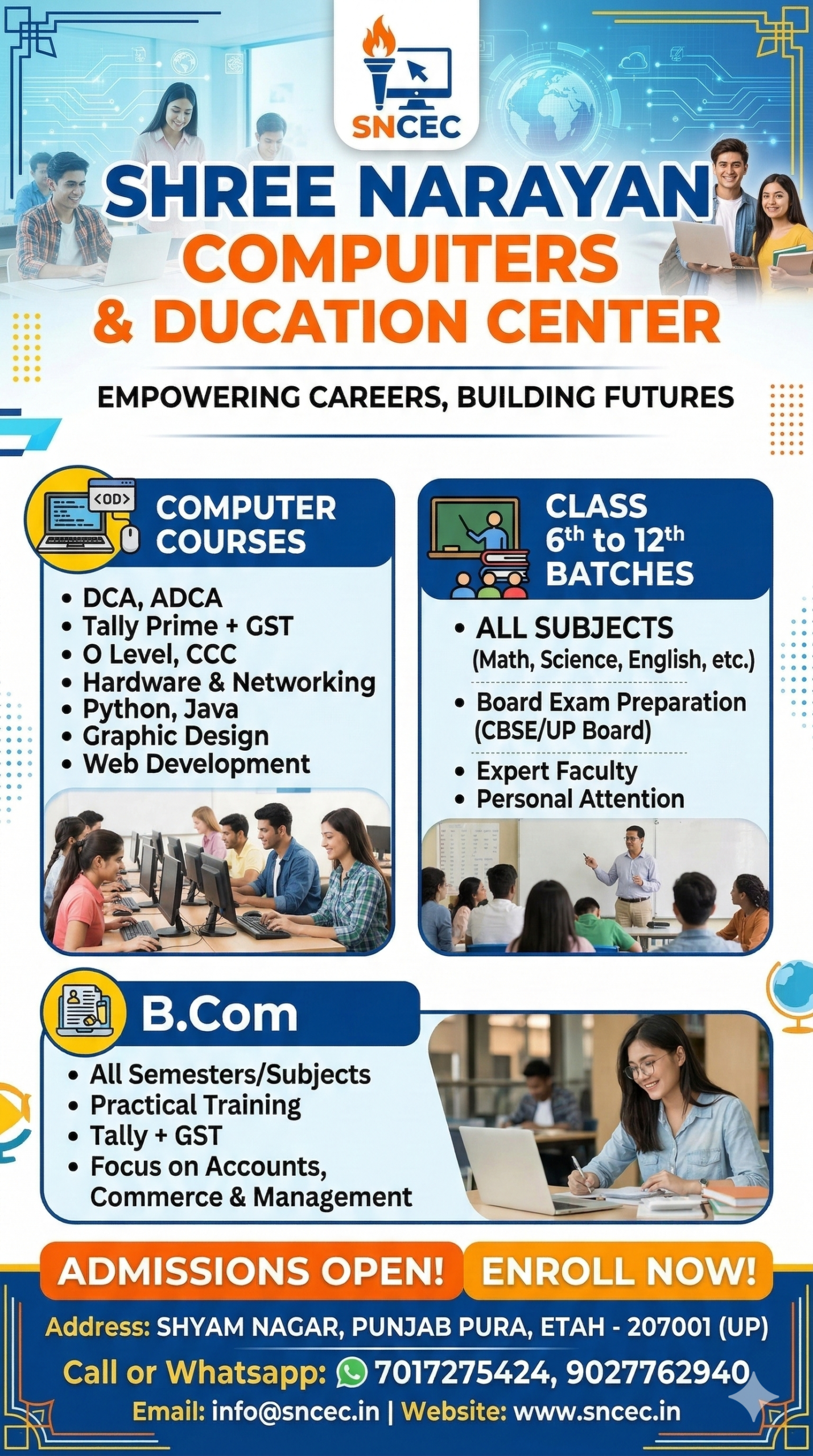
Shree Narayan Computer & Education Center is known for offering various computer education programs, vocational courses, and digital skill training. These types of institutes play an important role in helping students learn practical skills such as typing, office software, programming basics, and digital literacy. Instead of focusing only on theory, many of their programs are designed to help students build real-world abilities that can be used for employment or business opportunities.

Another reason students choose centers like this is accessibility. Many training institutes now allow online student registration, which means you can apply without visiting the center physically. This makes the process convenient for students living in different cities or rural areas. By completing the registration form online, students can secure their place in a course, upload required documents, and receive confirmation digitally.
Think of the registration process like getting a digital entry pass to your learning journey. Once your details are submitted and approved, the institute can create your student profile, track your course progress, and issue certificates when you complete training. Without registration, the institute cannot officially recognize you as a student.
Because of this, learning the correct registration steps, official link, and video tutorial instructions is essential for anyone planning to enroll at Shree Narayan Computer & Education Center. The next sections break down the process clearly so that even someone applying for the first time can follow along easily.
Mission and Educational Vision of the Institute
Every educational institution operates with a particular purpose, and Shree Narayan Computer & Education Center is no different. The primary mission of the institute is to make computer education affordable, practical, and accessible to students from different educational and economic backgrounds. In today’s digital world, basic computer knowledge is almost as essential as reading and writing, and the center aims to ensure that students are not left behind in this technological era.
The institute focuses on developing job-ready skills rather than purely academic knowledge. Many students enroll in computer training programs because they want to improve their employment prospects. By offering courses in areas such as MS Office, data entry, graphic design, basic programming, and internet applications, the center helps learners build abilities that employers actually value. This approach reflects a broader educational trend: practical training often leads to faster employment opportunities.
Another key part of the institute’s vision is digital empowerment. In many regions, people still have limited access to structured computer education. Training centers like Shree Narayan Computer & Education Center try to bridge this gap by providing structured programs, qualified instructors, and recognized certifications. These certifications can help students demonstrate their skills when applying for jobs or further education.
Student registration plays an important role in achieving this mission. When students officially register, the institute can maintain records, manage classes efficiently, and ensure that every learner receives proper training support. It also allows the institute to issue official certificates and examination credentials, which are essential for career growth.
Another interesting aspect of the institute’s educational vision is community development. By teaching computer literacy to a wide range of students—from school learners to working adults—the center contributes to building a digitally skilled workforce. In many ways, it acts as a bridge between traditional education and modern digital careers.
Because of this vision, the registration system is designed to be simple and accessible. Whether a student applies through an online registration link or follows a step-by-step video guide, the goal is to make the enrollment process smooth and welcoming for everyone who wants to learn.
Popular Courses Offered by the Center
One of the biggest reasons students search for Shree Narayan Computer & Education Center registration information is to enroll in its wide range of courses. The institute typically focuses on practical computer training programs that help students build useful technical skills in a relatively short period of time. These courses are often designed for beginners, intermediate learners, and sometimes advanced students who want to specialize in a specific field.
Among the most popular courses offered at many computer training centers are basic computer courses. These programs are usually the starting point for students who are completely new to computers. They cover essential topics such as operating systems, file management, internet browsing, email usage, and basic typing skills. For many learners, this course acts as the foundation that prepares them for more advanced computer training.
Another widely chosen program is the Diploma in Computer Applications (DCA) or similar certificate programs. These courses typically include training in Microsoft Office tools like Word, Excel, and PowerPoint, which are essential for office jobs. Students learn how to create documents, manage spreadsheets, prepare presentations, and organize digital data efficiently.
Many institutes also offer graphic design courses, where students learn software such as Photoshop, CorelDRAW, or other design tools. These skills can open opportunities in advertising agencies, social media management, printing businesses, and freelance design work. With the growth of online businesses, graphic design skills are more valuable than ever.
Some training centers also provide data entry operator courses, accounting software training, and basic programming classes. These programs help students gain specialized knowledge that can lead directly to employment opportunities in offices, small businesses, or freelance work.
Before registering, students often review the list of available courses and choose the one that best fits their career goals. That’s why the student registration process usually includes selecting a course during the application form stage.
Once the course is selected and registration is completed, students typically receive confirmation from the institute along with details about class schedules, training modules, and login access if online learning is available.

Why Student Registration Is Important
When students first hear about a training institute like Shree Narayan Computer & Education Center, many of them immediately start thinking about the courses they want to take. However, before any class begins, there is one crucial step that cannot be skipped: student registration. Registration is more than just filling out a form. It is the official process that records a student’s identity, course selection, and eligibility within the institute’s system.
Think of student registration as the gateway to becoming an official member of the institute. Without registration, the institute cannot create a student profile, track attendance, schedule exams, or issue certificates. For administrative purposes, every educational organization requires accurate records of the students who are enrolled in its programs. This is why institutes maintain a registration system—often online—to collect important student information such as name, contact details, educational background, and chosen course.
Another major reason registration is important is verification and accountability. Educational institutes must ensure that the students participating in their courses are properly documented. This helps maintain credibility and ensures that the certificates issued by the institute correspond to real students who completed the training. When a student later applies for a job or further education, having a registered record with the institute helps confirm the authenticity of their certification.
Registration also helps the institute organize its resources more effectively. When the center knows how many students have enrolled in a specific course, it can arrange teachers, classrooms, study materials, and computer lab access accordingly. Imagine a computer class with 30 students but only 10 computers available—registration data helps prevent such situations by allowing the institute to plan ahead.
In the digital age, most institutes have shifted toward online registration systems, which are faster and more convenient than traditional paper forms. Students can simply click the official registration link, fill in their details, upload required documents, and submit their application within minutes. Some institutes even provide a video tutorial explaining the registration process, making it easier for students who are not familiar with online forms.
For students planning to join Shree Narayan Computer & Education Center, completing the registration process ensures that they are officially enrolled, eligible for training, and able to receive certificates after completing their course.
Benefits of Being an Officially Registered Student
Becoming an officially registered student at Shree Narayan Computer & Education Center offers several advantages that go far beyond simply attending classes. Registration ensures that the institute recognizes you as a legitimate participant in its training programs. This recognition unlocks a variety of benefits that can support both your learning experience and future career opportunities.
One of the most important benefits is access to structured learning resources. Registered students often receive study materials, course modules, and practice assignments designed to help them understand computer concepts effectively. These resources are carefully organized according to the course curriculum, ensuring that students progress step by step instead of feeling overwhelmed by complex topics.
Another major benefit is the ability to participate in official examinations and assessments. Many computer training institutes conduct internal tests or final exams to evaluate student progress. These exams are typically available only to registered students because the institute needs to maintain proper academic records. Once a student passes the examination, the institute can issue a certificate verifying their achievement.
Registration also allows students to receive a unique student identification number or login credentials. This student ID becomes your personal identity within the institute’s system. It can be used to check course updates, view exam schedules, download certificates, or track learning progress. In some centers, the student ID also provides access to online learning portals where lectures and practice materials are available.
Another overlooked benefit is career credibility. When employers see that a student has completed training from a recognized institute with proper registration records, the certification carries more weight. Employers often prefer candidates who can demonstrate both skills and formal training documentation.
Many students also benefit from networking opportunities after registration. Training centers bring together learners from different educational backgrounds and career goals. This environment allows students to share knowledge, collaborate on projects, and build professional connections that can be helpful later in their careers.
Because of these advantages, registration should not be viewed as just a formality. Instead, it should be seen as the first official step in a student’s professional learning journey, opening doors to education, certification, and future opportunities.
Access to Certificates, Exams, and Training Resources
One of the biggest reasons students choose to register with institutes like Shree Narayan Computer & Education Center is the opportunity to earn recognized certificates and structured training. In the world of computer education, having proof of your skills can make a significant difference when applying for jobs, internships, or freelance work.
After completing the registration process, students become eligible to participate in the institute’s training programs and evaluation systems. These evaluations usually come in the form of quizzes, assignments, or final examinations that test the student’s understanding of the course material. Without proper registration, it would be difficult for the institute to track a student’s performance or verify whether they have successfully completed the required training.
Certificates are often the most valuable outcome of a training program. When students complete their courses and pass the necessary exams, the institute can issue an official certificate confirming their qualification. This document can be added to resumes, job applications, or professional portfolios. For students entering the workforce, even a basic computer certification can significantly improve employability.
Registration also gives students access to various learning resources and training facilities. These may include computer labs, digital study materials, software tools, and guided practice sessions. In many institutes, instructors also provide personal guidance and technical support to help students overcome challenges during the course.
Another advantage is the possibility of online learning access. Some computer education centers provide digital platforms where registered students can log in and access lecture recordings, assignments, and additional practice materials. This allows students to learn at their own pace while still following the institute’s structured curriculum.
In many ways, registration acts like a key that unlocks the institute’s entire educational ecosystem. From training sessions and exams to certificates and career development opportunities, all of these benefits become available only after a student officially registers.
Understanding this connection between registration and educational benefits helps students appreciate why the registration process is such an essential step before beginning their training journey.
Requirements Before Starting Student Registration
Before beginning the student registration process at Shree Narayan Computer & Education Center, it is important to prepare a few essential items in advance. Many students rush directly to the registration form and then realize they don’t have the required documents or information ready. This can interrupt the process and sometimes cause incomplete applications. Preparing everything beforehand makes the registration process smooth, quick, and stress-free.
Most educational institutes collect a set of basic personal and academic details during registration. These details help the institute maintain accurate records for every student. Typical information requested in the registration form includes the student’s full name, date of birth, address, phone number, email address, and educational qualifications. These details allow the institute to identify each student correctly and contact them when necessary.
Another important requirement is course selection. Students usually need to choose which program they want to enroll in during the registration process. For example, someone interested in office work might choose a Microsoft Office or DCA course, while another student interested in design might choose a graphic design program. Selecting the correct course ensures that students are placed in the right training group.
Many institutes also require students to upload certain documents to verify their identity and educational background. These documents help confirm that the student meets the eligibility requirements for the course. In online registration systems, this usually means uploading scanned copies or clear photos of the documents.
In addition to documents, students should ensure they have a stable internet connection and a compatible device such as a smartphone, tablet, or computer. Online forms sometimes require multiple steps, including uploading files and verifying details, so having a reliable connection prevents errors during submission.
Preparing these requirements beforehand saves time and prevents mistakes. Instead of stopping halfway through the form, students can complete the entire registration process in one session. Think of it like preparing ingredients before cooking a meal—when everything is ready, the process becomes much faster and more efficient.
Documents Required for Registration
Documents play an important role in the student registration process, as they help verify the identity and qualifications of the applicant. Educational institutes need these documents to maintain accurate records and ensure that each student meets the requirements for the selected course. While the exact list of documents may vary depending on the institute, most computer education centers request similar types of identification and academic proof.
One of the most commonly required documents is a government-issued identity proof. This could be an Aadhaar card, passport, voter ID card, or any other recognized identification document. The purpose of this document is to confirm the student’s identity and ensure that the registration details match official records.
Another frequently required document is educational qualification proof. For example, students may need to upload a copy of their most recent school or college certificate. If someone is enrolling in an advanced computer course, the institute might require proof that the student has completed certain previous levels of education.
Most institutes also request passport-size photographs during registration. These photos are used for the student’s profile, ID card, and official records within the institute’s system. When uploading photos online, students should make sure the image is clear and meets the required size or format guidelines.
Some training centers also ask for address proof, which helps verify the student’s place of residence. This could include documents like utility bills, identification cards, or other official records containing the student’s address.
When submitting documents online, students should ensure that the scanned copies or photos are clear, readable, and correctly oriented. Blurry images or incomplete documents can lead to registration delays because the institute may need to request a new upload.
Preparing these documents in advance helps students complete the registration form without interruptions. It also reduces the chances of application rejection due to missing or unclear information.
Technical Requirements for Online Registration
In today’s digital learning environment, many institutes—including Shree Narayan Computer & Education Center—offer online student registration systems. These systems allow students to apply for courses from the comfort of their homes without needing to visit the institute physically. While this process is convenient, it does require a few basic technical preparations to ensure everything works smoothly.
The first requirement is a device with internet access. This could be a smartphone, laptop, desktop computer, or tablet. Most modern registration forms are mobile-friendly, meaning students can complete them directly from their phones. However, using a laptop or desktop computer can sometimes make the process easier, especially when uploading documents.
A stable internet connection is also essential. Online forms usually involve several steps, including filling out information fields, uploading documents, and submitting the application. If the internet connection drops during submission, the form may not be processed correctly. Using a reliable Wi-Fi connection or stable mobile data helps prevent this issue.
Students should also have digital copies of required documents ready before starting the registration process. These files are typically uploaded in formats such as JPG, PNG, or PDF. Keeping the files organized in a folder makes them easy to find when the form asks for them.
Another helpful preparation is ensuring that the web browser is updated. Browsers such as Chrome, Firefox, Edge, or Safari generally support modern registration systems. Outdated browsers can sometimes cause problems with form loading or file uploads.
Students should also keep their email address and phone number accessible, as many registration systems send verification codes or confirmation messages. Entering the correct contact details ensures that students receive important updates about their registration status.
Taking a few minutes to prepare these technical requirements can make the registration process much smoother. Instead of dealing with errors or interruptions, students can focus on completing their application quickly and accurately.
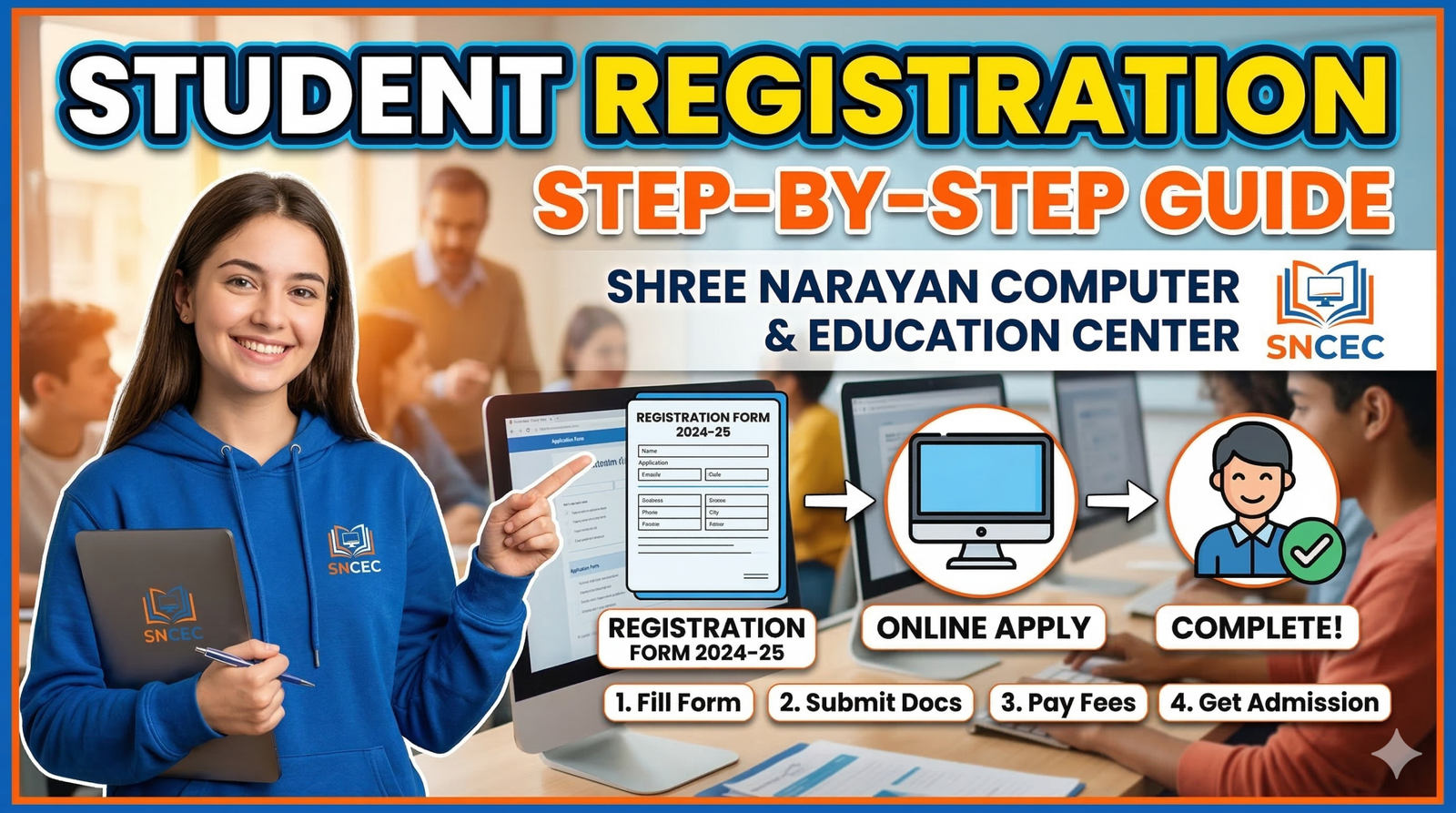
Step-by-Step Process for Student Registration
The student registration process for Shree Narayan Computer & Education Center is generally designed to be simple and user-friendly. Even students who are not very familiar with online systems can complete the process by following a few clear steps. Understanding the entire process before starting helps prevent confusion and ensures that the application is submitted correctly.
Most registration systems follow a similar pattern. Students first visit the official website or registration portal, then fill out a form containing personal details and course information. After entering the required information, they upload documents and submit the application. Some institutes also require payment of a registration fee before confirming the enrollment.
The key to completing the process successfully is carefully checking every detail before submission. Small mistakes, such as incorrect phone numbers or misspelled names, can cause problems later when the institute creates the student’s official record.
Another helpful tip is to save screenshots or confirmation messages after submitting the form. These records can serve as proof of registration in case there are any technical issues or delays in processing the application.
Many institutes also provide video tutorials showing the registration process step by step. These videos guide students through each stage, making it easier to understand how to fill out the form correctly. Watching a tutorial before starting the registration can be very helpful, especially for first-time applicants.
By following the steps carefully and preparing the required documents in advance, students can usually complete the registration process within a few minutes.
Step 1 – Visit the Official Registration Website
The first step in registering as a student is to visit the official website or registration portal of Shree Narayan Computer & Education Center. This is where the entire application process begins. The website usually contains information about available courses, admission requirements, and the online registration form.
Students should always make sure they are using the official website link provided by the institute. Sometimes unofficial links or outdated pages may appear in search results, which can cause confusion. The official website typically includes the institute’s logo, contact details, and clear navigation menus that lead to the registration section.
Once on the website, students should look for options such as “Student Registration,” “Apply Now,” “Admission Form,” or “Online Enrollment.” Clicking this link will open the registration form where applicants can begin entering their details.
Before filling out the form, it is a good idea to read any instructions provided on the page. These instructions often explain the required documents, acceptable file formats, and eligibility criteria for different courses. Understanding these guidelines helps students avoid mistakes during the application process.
The registration page may also include additional information such as course duration, training schedules, and fee structures. Reviewing this information can help students confirm that they are selecting the right course for their goals.
After locating the registration form, students can begin the application process by entering their personal details. This marks the official start of their journey toward becoming a student at the institute.
Step 2 – Fill Out the Student Registration Form
Once students reach the official registration page of Shree Narayan Computer & Education Center, the next step is completing the student registration form. This form acts as the institute’s primary way of collecting essential information about new students. While it might look long at first glance, the process is usually straightforward if each section is filled carefully.
The form generally begins with basic personal information. Students are asked to enter details such as their full name, father’s or guardian’s name, date of birth, gender, and contact information. It is very important to type these details exactly as they appear on official documents like identity cards or school certificates. Even a small spelling mistake can cause problems later when the institute prepares certificates or student records.
Next, the form usually asks for contact details, including a mobile number and email address. These details are extremely important because the institute uses them to send notifications about admission confirmation, class schedules, exam dates, and other important updates. Students should double-check their phone number and email before moving to the next section.
Another important part of the form is educational qualification. Here, students provide information about their previous education, such as the last class or degree they completed. This helps the institute determine whether the student meets the eligibility requirements for the chosen course.
The form also includes a course selection section. Students must select the specific program they want to enroll in. For example, this might include options like Basic Computer Course, DCA, Graphic Design, or other technical training programs offered by the center. Choosing the correct course ensures that students are assigned to the appropriate training group.
Many online forms also include a review or preview option before final submission. This allows students to check all the information they entered and correct any mistakes. Taking a few extra seconds to review the form can prevent errors that might delay the registration process.
Completing the registration form accurately is one of the most important steps in the entire enrollment process. It ensures that the institute has the correct information needed to create the student’s official profile.
Step 3 – Upload Required Documents
After filling out the registration form, students are usually asked to upload the required documents. This step allows the institute to verify the student’s identity, educational background, and other important details. Online document submission has become common in modern educational systems because it saves time and eliminates the need for physical paperwork.
Typically, the registration system will display specific fields where students can upload different types of documents. These may include identity proof, educational certificates, passport-size photographs, and sometimes address proof. Each document usually has its own upload section to keep the records organized.
When uploading documents, students should ensure that the files are clear and readable. Blurry or low-quality images may be rejected because the institute cannot verify the information properly. Using a scanner or a high-quality smartphone camera usually produces the best results. It is also important to follow the file size and format requirements mentioned on the registration page.
Most systems accept files in formats such as JPG, PNG, or PDF. If the file size is too large, students may need to compress the image or convert it to a supported format before uploading. Many free tools and mobile apps can help with this process.
Another important tip is to name the files properly before uploading them. For example, a student might label files as “Aadhaar_Card.jpg” or “Photo.jpg”. This makes it easier for the institute to review and manage the documents in their system.
Once all required documents are uploaded, the system may show a confirmation message indicating that the files have been successfully attached to the application. Students should check each upload carefully to ensure that the correct document appears in the right section.
Uploading documents correctly ensures that the institute can process the application without delays. It also helps create a complete student profile in the institute’s records.
Step 4 – Submit the Application and Pay Registration Fees
The final step in the registration process is submitting the completed application and paying any required registration fees. After entering all personal details and uploading documents, students usually see a submit button at the bottom of the registration form. Clicking this button sends the application to the institute’s system for review.
Before pressing submit, it is highly recommended to review all the information again. Students should check their name spelling, contact number, email address, selected course, and uploaded documents. Correcting mistakes at this stage is much easier than trying to fix them later.
Once the application is submitted, some institutes require students to pay a registration or admission fee. This fee confirms the student’s intention to enroll in the course. Payment methods may vary depending on the institute’s system. Common options include online payment through debit cards, credit cards, mobile wallets, UPI, or bank transfers.
After the payment is completed, the system usually generates a confirmation message or registration number. This number is extremely important because it acts as proof that the student has successfully applied. Students should save this number or take a screenshot for future reference.
In many cases, the institute will also send a confirmation message via SMS or email. This message may include additional information such as the student ID, login credentials, or instructions for the next steps in the admission process.
Submitting the application marks the official completion of the student registration process. After this step, the institute reviews the application and activates the student profile. Once approved, the student can begin attending classes and accessing learning resources.
Student Registration Link and How to Use It
Where to Find the Official Registration Link
Finding the correct student registration link for Shree Narayan Computer & Education Center is an important step for anyone planning to enroll in a course. Many students search online for the registration page, but not every link on the internet leads to the official form. To avoid confusion or incorrect websites, students should always rely on trusted sources when looking for the registration link.
The most reliable place to find the official registration link is the institute’s official website. Educational institutes typically place the registration option in a clearly visible section such as the homepage menu or admissions page. Links labeled “Student Registration,” “Apply Online,” or “Admission Form” usually lead directly to the correct application portal.
Another way to obtain the registration link is through the institute’s official social media pages. Many educational centers maintain active pages on platforms like Facebook, YouTube, or WhatsApp groups where they share updates about admissions and training programs. These pages often provide the official link along with instructions for new students.
Students can also receive the registration link directly from the training center’s office or staff members. If someone visits the institute in person or contacts them through phone or messaging apps, staff members can provide the correct link and explain the registration steps.
Sometimes institutes include the registration link in informational videos or tutorials posted on YouTube. These videos walk students through the application process while displaying the link in the video description or comments section.
Using the correct registration link ensures that the student’s information is submitted directly to the institute’s official system. This prevents potential issues such as lost applications or incorrect submissions.
How to Verify the Authentic Registration Page
In the digital world, it is always important to confirm that the website you are using is genuine. When registering for a course at Shree Narayan Computer & Education Center, students should take a few simple steps to verify that the registration page is authentic.
First, students should check the website address (URL) carefully. Official institute websites usually contain the name of the organization or a recognizable domain. Suspicious links or websites with unusual spellings may not be legitimate.
Another way to verify authenticity is by looking for official branding elements on the website. This includes the institute’s logo, contact details, and information about courses and training programs. A genuine registration page usually matches the design and information found on the institute’s official website.
Students can also confirm the link by contacting the institute directly. If there is any uncertainty, calling the training center or sending a message through their official communication channels can help verify whether the link is correct.
Checking for secure website indicators is another helpful step. Many authentic websites display a small padlock symbol in the browser’s address bar, indicating that the connection is secure.
Taking these precautions helps students avoid potential problems and ensures that their personal information is submitted safely.
Conclusion
Registering at Shree Narayan Computer & Education Center is a simple but essential step for anyone who wants to begin their journey in computer education. The process starts with understanding the institute and choosing the right course, followed by preparing necessary documents and accessing the official registration link. Once students fill out the registration form, upload documents, and submit the application, they become officially enrolled in the institute’s system.
The registration process is designed to be convenient, especially with online application systems that allow students to apply from home. By following the correct steps and verifying the official website, students can complete their registration quickly and avoid unnecessary mistakes.
After successful registration, students gain access to structured training programs, exams, study materials, and certificates that can help improve their career opportunities. In today’s digital world, computer education plays an important role in professional development, and institutes like Shree Narayan Computer & Education Center help students gain practical skills needed for modern workplaces.
Completing the registration process is essentially the first milestone in a student’s learning journey. Once this step is finished, students can focus on developing their computer skills, building knowledge, and preparing for future career opportunities.
FAQs
1. How can I register at Shree Narayan Computer & Education Center?
Students can register by visiting the institute’s official website registration page, filling out the online form, uploading required documents, and submitting the application. Some centers also allow offline registration at their office.
2. Is there an online registration link available?
Yes, most institutes provide an online student registration link on their official website or social media pages. Students should always use the official link shared by the institute.
3. What documents are required for student registration?
Commonly required documents include identity proof, passport-size photo, educational certificates, and sometimes address proof. The exact requirements may vary depending on the course.
4. Can I register using my mobile phone?
Yes. Most modern registration forms are mobile-friendly, allowing students to complete the entire application process using a smartphone with internet access.
5. How do I know if my registration was successful?
After submitting the application, students usually receive a confirmation message, registration number, or email notification from the institute confirming that the registration has been completed.