English Typing
What Is English Typing?
English typing is more than just pressing keys on a keyboard. It’s the art and skill of converting thoughts into written English using a digital device. At first glance, it might seem like a simple mechanical action—your fingers tap on keys, letters appear on the screen, and that’s it. But when you look closer, you realize that typing is a powerful communication tool that connects ideas, businesses, and people across the world.
Think about how often you type every single day. You send emails, draft reports, post on social media, search on Google, chat with friends, or maybe even write articles like this. Every time you do that, you’re engaging in English typing. It has quietly become one of the most essential skills in the modern world. In fact, studies suggest that the average office worker spends nearly 3 to 4 hours per day typing, whether it’s emails, documents, or messages. That’s a huge chunk of time.
English typing specifically refers to typing in the English language, which is considered the global language of business, technology, and academia. Whether you’re in India, Germany, Nigeria, or Brazil, English is often the default language for professional communication. That makes English typing not just a skill—but a global passport.
It also combines multiple micro-skills: spelling, grammar awareness, hand-eye coordination, and speed control. Good typists don’t just type fast; they type accurately and confidently. Their fingers move almost automatically, like a pianist playing a familiar melody.
If you think about it, typing is the bridge between your brain and the digital world. The faster and smoother that bridge works, the more productive and expressive you become. And that’s exactly why mastering English typing is so important today.

Why English Typing Matters in the Digital Age
We live in a world where almost everything is digital. Work, education, shopping, communication, entertainment—nearly every aspect of life involves a screen and a keyboard. That’s where English typing skills become incredibly valuable.
Imagine trying to build a career today without being able to type efficiently. Whether you’re a student submitting assignments, a freelancer sending proposals, a corporate employee drafting reports, or an entrepreneur managing online orders, typing is unavoidable. In fact, many employers expect a minimum typing speed of 40–60 words per minute (WPM) for administrative or data entry roles. Some specialized jobs even demand 70+ WPM with high accuracy.
But it’s not just about speed. It’s about productivity. If you type slowly, your thoughts get interrupted. You lose your flow. It feels like trying to run through mud. On the other hand, when you type smoothly, your ideas flow freely. You stay focused. You think less about the keyboard and more about the message.
English typing also matters because English dominates the internet. Reports indicate that more than 50% of online content is in English, making it the most widely used language online. That means if you can type well in English, you unlock access to global conversations, job markets, and learning opportunities.
There’s another layer too—confidence. When you can type quickly and accurately, you respond faster to emails, participate in live chats without hesitation, and complete assignments efficiently. You don’t feel left behind.
Typing today is what handwriting was 100 years ago. It’s a basic literacy skill for the digital era. And just like handwriting once defined professionalism, typing now defines digital competence. If you want to thrive in this fast-paced world, English typing isn’t optional—it’s essential.
Different Types of English Typing
Not all typing is the same. When we talk about English typing, we’re actually referring to several different styles and purposes. Understanding these types can help you figure out where you stand and what you need to improve.
First, there’s basic typing. This is what most people do daily—typing messages, emails, or short documents without worrying too much about speed or technique. It’s casual and functional. You look at the keyboard, press keys, correct mistakes, and move on.
Then comes touch typing, which is a more advanced method. Here, you type without looking at the keyboard. Your fingers rely on muscle memory instead of sight. This dramatically increases speed and accuracy. Professional typists and experienced office workers usually use this method.
Another type is copy typing, often used in data entry or transcription jobs. In this case, you type text exactly as it appears from a source—whether it’s handwritten notes, printed documents, or audio recordings. This type requires extreme accuracy because even small errors can change meaning.
There’s also creative typing, which involves writing blogs, stories, articles, or marketing content. Here, speed is important, but creativity and language skills matter just as much. The typist isn’t just copying—they’re thinking, structuring, and composing in real time.
Finally, we have technical typing, which includes coding, programming, and typing with symbols, commands, and special characters. This type demands familiarity with shortcuts and keyboard efficiency.
Each type serves a different purpose. Some prioritize speed. Others focus on precision. Some require creativity, while others demand strict accuracy. The beauty of English typing is that it adapts to your needs. Whether you’re chatting casually or drafting a legal document, typing remains your primary digital voice.
Essential Skills for Mastering English Typing
If you want to truly master English typing, you need more than just fast fingers. You need a combination of technical ability, language awareness, and disciplined practice. Think of typing like driving a car. You don’t just press the accelerator—you also steer, brake, and follow traffic rules.
One of the first essential skills is keyboard familiarity. You should know where every key is located without searching for it. This familiarity reduces hesitation and increases rhythm. When your fingers instinctively know where to go, your typing becomes fluid instead of fragmented.
Another critical skill is spelling and grammar awareness. Fast typing is useless if every sentence is full of errors. Strong English fundamentals make a huge difference. When you understand sentence structure and common word patterns, you make fewer mistakes.
Then there’s focus and rhythm. Good typists maintain a steady pace instead of rushing. They treat typing like a consistent flow rather than random bursts of speed. That rhythm improves endurance, especially when working on long documents.
You also need error recognition skills. The best typists can spot mistakes instantly and correct them without breaking their flow. This ability comes from practice and attention to detail.
Finally, patience plays a big role. Many beginners get frustrated because they want instant speed. But typing mastery takes time. It’s like building a muscle—you strengthen it gradually through repetition.
When you combine all these skills, typing stops feeling like a task. It becomes automatic. Your hands work while your brain focuses entirely on ideas. And that’s when English typing transforms from a basic skill into a powerful productivity tool.
Touch Typing and Muscle Memory
Touch typing is often considered the gold standard of typing skills. It means typing without looking at the keyboard, relying entirely on muscle memory. At first, this might sound impossible. How can your fingers know where to go without your eyes guiding them? But just like riding a bicycle, once your muscles learn the pattern, they never forget.
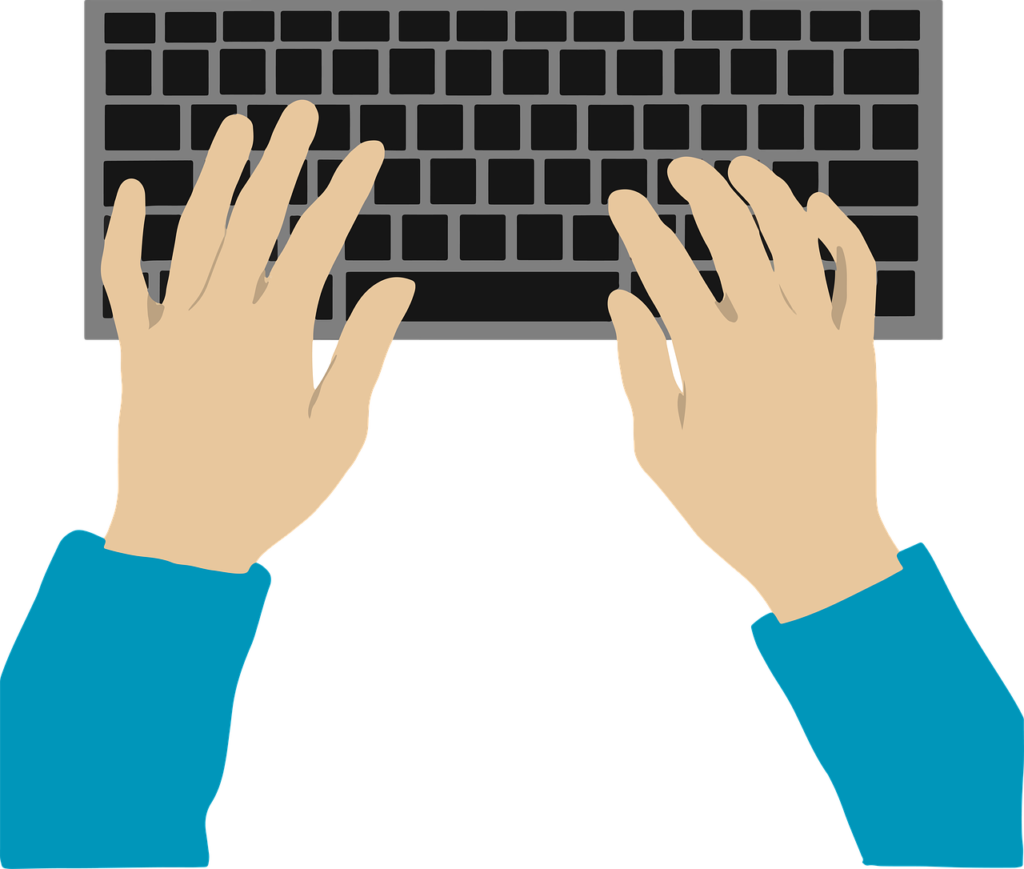
The foundation of touch typing is the home row position—placing your fingers on the middle row of the keyboard (A, S, D, F for the left hand and J, K, L, ; for the right hand). From there, each finger is responsible for specific keys. With consistent practice, your brain creates neural pathways that link certain letters to specific finger movements.
Research in motor learning shows that repetitive actions strengthen neural connections, making movements faster and more automatic over time. That’s exactly what happens with touch typing. At first, you think about every letter. After weeks of practice, your fingers move independently of conscious thought.
The benefits are huge. Touch typing increases speed, improves accuracy, and reduces neck strain because you’re not constantly looking down. It also boosts confidence. Imagine typing an entire page while maintaining eye contact with your screen—that’s efficiency at its best.
The key is consistency. Even practicing 15–20 minutes daily can dramatically improve muscle memory. It may feel slow at the beginning, but once it clicks, it feels like unlocking a superpower.
Balancing Speed and Accuracy
When people talk about typing skills, they usually obsess over speed. “How many words per minute can you type?” becomes the ultimate question. But here’s the truth—speed without accuracy is meaningless.
Imagine typing 80 WPM but making errors in every sentence. You’d spend extra time correcting mistakes, which cancels out your speed advantage. That’s why professional environments often prioritize accuracy rates of 95–98% or higher.
The secret is balance. Think of speed and accuracy as two sides of a coin. If you push too hard for speed, accuracy drops. If you focus only on accuracy, you may type too slowly. The goal is steady improvement in both areas simultaneously.
A practical approach is to start slow and perfect. Type at a comfortable pace where you make minimal mistakes. Gradually increase your speed while maintaining control. Over time, your baseline speed naturally rises without sacrificing precision.
Another helpful strategy is reviewing your errors. Pay attention to commonly mistyped words. Are you rushing certain letter combinations? Are your fingers overlapping responsibilities? Identifying patterns helps you correct weaknesses efficiently.
Typing tests can also be useful benchmarks. They give you measurable data on both WPM and accuracy. But remember, real-world typing isn’t just about numbers—it’s about effective communication.
When you achieve harmony between speed and accuracy, typing feels effortless. Your thoughts flow smoothly onto the screen, almost as fast as you can think them. That’s the sweet spot every aspiring typist should aim for.
Understanding Keyboard Layouts
When you sit down to practice English typing, you probably don’t think much about the keyboard itself. It’s just… there. But the layout of your keyboard plays a massive role in how efficiently you type. In fact, the arrangement of keys directly affects your speed, comfort, and even long-term health. It’s like the steering wheel of a car—if it’s awkwardly positioned, the whole driving experience becomes frustrating.
Most people use a standard keyboard layout without ever questioning it. They assume this is the only way letters can be arranged. But that’s not true. Keyboard layouts were actually designed with specific goals in mind, sometimes even based on the technology limitations of the past. Understanding how these layouts work can help you make smarter choices about your typing journey.
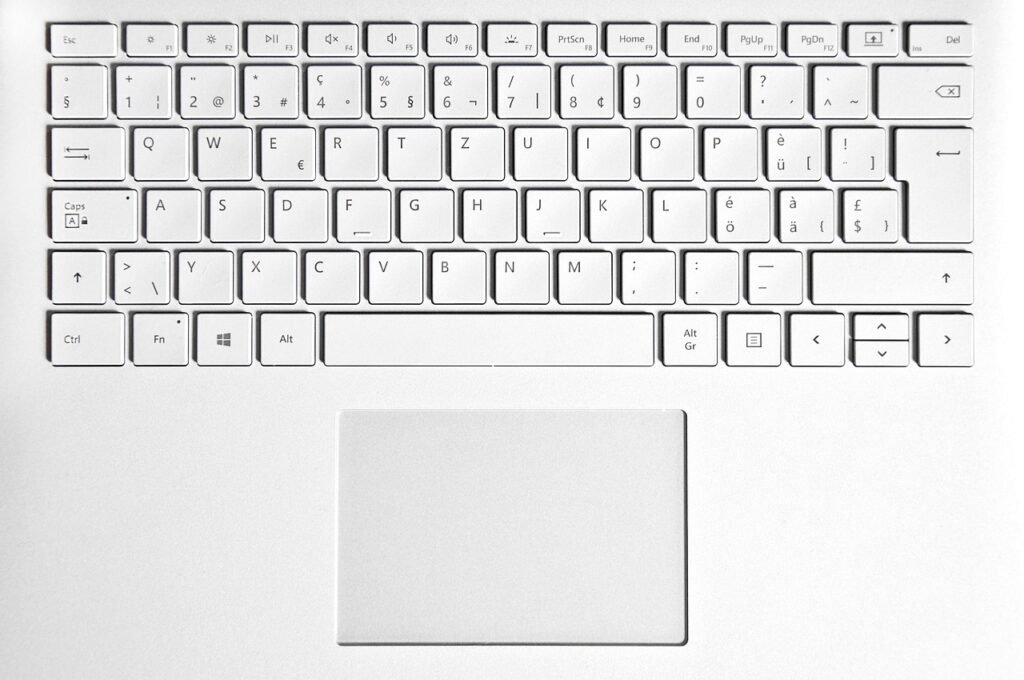
Another thing to consider is device variation. Typing on a desktop keyboard feels different from typing on a laptop. And that feels different from typing on a tablet or smartphone. Key spacing, travel distance, and feedback all influence performance. Mechanical keyboards, for example, are often preferred by heavy typists because they provide tactile feedback and reduce accidental keystrokes. Membrane keyboards, on the other hand, are quieter and more common in offices.
If you’re serious about improving your English typing speed and accuracy, you shouldn’t ignore your tools. Ask yourself: Is your keyboard comfortable? Are the keys responsive? Do your fingers feel cramped after long sessions? Small ergonomic improvements can make a big difference.
Let’s explore the most common layout you’re probably using—and some alternatives that might surprise you.
The QWERTY Standard
The QWERTY keyboard layout is the most widely used keyboard arrangement in the world. If you look at the top row of letters on your keyboard, you’ll see Q-W-E-R-T-Y—that’s where the name comes from. It was developed in the 1870s for typewriters by Christopher Latham Sholes. Interestingly, it wasn’t designed for speed. It was designed to prevent typewriter keys from jamming by separating commonly used letter pairs.
Fast forward more than a century, and we’re still using QWERTY—even though we no longer deal with mechanical typewriter jams. Why? Habit and standardization. Once schools, offices, and manufacturers adopted QWERTY, it became nearly impossible to replace. It’s like driving on the right side of the road in certain countries—it’s not necessarily perfect, but everyone follows the same system.
The advantage of QWERTY is familiarity. Nearly every computer, laptop, and public keyboard uses it. This makes it incredibly practical. You don’t have to relearn layouts when switching devices. Training programs, typing tests, and tutorials are mostly built around QWERTY as well.
However, some experts argue that QWERTY isn’t the most efficient layout for modern English typing. Studies analyzing letter frequency suggest that many common letters are placed in less accessible positions, forcing unnecessary finger movement. Despite this, skilled typists can still reach speeds above 100 WPM on QWERTY. That proves one important thing: layout matters, but practice matters more.
For most people, sticking with QWERTY makes sense. It’s universal, reliable, and supported everywhere. If you’re just starting out, mastering QWERTY through touch typing techniques will give you the strongest foundation.
Alternative Keyboard Layouts
While QWERTY dominates the world, it’s not the only option. There are alternative keyboard layouts designed specifically to improve speed, comfort, and efficiency. Two of the most well-known alternatives are Dvorak and Colemak.
The Dvorak Simplified Keyboard was created in the 1930s by Dr. August Dvorak. Unlike QWERTY, Dvorak was scientifically designed to increase typing efficiency. It places the most commonly used English letters on the home row, reducing finger movement. Supporters claim that this leads to faster speeds and less fatigue. Some studies have suggested improved comfort and reduced error rates for trained Dvorak users.
Colemak, introduced in 2006, is a more modern alternative. It keeps many QWERTY keys in the same position while optimizing letter placement for efficiency. This makes it easier to transition from QWERTY compared to Dvorak. Colemak users often report smoother typing experiences and reduced strain during long sessions.
Here’s a quick comparison:
| Layout | Learning Curve | Efficiency | Popularity |
|---|---|---|---|
| QWERTY | Easy (default) | Moderate | Very High |
| Dvorak | High | High | Low |
| Colemak | Moderate | High | Growing |
Switching layouts isn’t for everyone. It requires retraining muscle memory from scratch, which can temporarily reduce productivity. But for dedicated typists or professionals who spend 6–8 hours typing daily, the long-term comfort benefits might be worth it.
Ultimately, the best keyboard layout is the one you can use comfortably and consistently. No layout will magically make you fast overnight. Practice and discipline still rule the game.
How to Improve Your English Typing Skills
Improving English typing skills isn’t about random practice. It’s about structured, intentional improvement. Think of it like going to the gym. If you lift weights without a plan, progress is slow. But if you follow a routine, track results, and gradually increase intensity, growth becomes inevitable.
The first step is identifying your baseline. Take a typing test to measure your words per minute (WPM) and accuracy percentage. Once you know where you stand, set realistic goals. If you’re at 30 WPM, aim for 40. If you’re at 50, aim for 60. Small, consistent improvements beat unrealistic jumps.
Consistency is key. Practicing 15–30 minutes daily is far more effective than practicing two hours once a week. Daily repetition strengthens muscle memory and builds confidence. Over time, your fingers move naturally without hesitation.
It’s also important to practice real-world typing. Instead of only typing random word lists, try typing articles, emails, or book excerpts. This exposes you to punctuation, capitalization, and varied vocabulary. English typing isn’t just about letters—it’s about complete communication.
Another overlooked tip is minimizing distractions. Typing while constantly checking your phone reduces focus. Create a quiet environment where you can concentrate fully on rhythm and accuracy.
Progress may feel slow at first. But after a few weeks, you’ll notice something magical: your thoughts start appearing on the screen almost instantly. That’s when you know your practice is paying off.
Building a Daily Practice Routine
A strong daily typing routine acts like compound interest. Small daily investments create massive long-term results. The key is structure.
Start with a five-minute warm-up. Type simple sentences focusing on accuracy. This prepares your fingers and brain. Then spend 10–15 minutes on focused exercises targeting weak keys or letter combinations. For example, if you struggle with “th” or “ing,” practice words that emphasize those patterns.
End your session with a timed typing test. Track your WPM and accuracy in a notebook or spreadsheet. Watching your progress climb is incredibly motivating. It turns practice into a measurable challenge.
Variety also keeps things interesting. One day practice formal paragraphs. Another day type dialogues. Another day focus on punctuation. This prevents boredom and builds versatile skills.
Consistency beats intensity. Even on busy days, try to practice at least 10 minutes. Skipping too many days weakens muscle memory.
Over time, this daily ritual becomes automatic—just like brushing your teeth. And the results? Faster speed, higher accuracy, and unstoppable confidence.
Using Online Tools and Software
Technology makes improving English typing speed easier than ever. There are countless online platforms offering typing lessons, speed tests, and interactive exercises. Many of them provide real-time feedback, highlighting errors and tracking improvement.
Popular typing tools include structured courses that guide beginners from basic key placement to advanced speed drills. Some platforms even analyze your weak letters and generate personalized exercises. That’s like having a digital coach correcting your form.
Typing software also gamifies progress. Leaderboards, badges, and streak counts add motivation. If you’re competitive, this can push you to practice more consistently.
Another benefit of online tools is exposure to diverse text types. You can practice business emails, storytelling, coding snippets, or even historical speeches. This broadens vocabulary and strengthens overall English fluency.
The key is not jumping between too many platforms. Pick one or two reliable tools and stick with them for several weeks. Mastery comes from repetition, not constant switching.
Technology can accelerate growth—but only if you use it consistently.
Learning Through Typing Games
Who says practice has to be boring? Typing games transform repetitive drills into engaging challenges. They combine speed, accuracy, and fun elements that make you forget you’re even training.
Some games involve racing against virtual opponents. Others require you to type words quickly to defeat characters or complete missions. The pressure adds excitement, encouraging faster reaction times.
Gamification triggers dopamine—the brain’s reward chemical. That means you’re more likely to stick with practice. Instead of dreading typing sessions, you look forward to them.
Typing games are especially helpful for beginners and students. They reduce anxiety and make mistakes feel less intimidating. Instead of focusing on failure, you focus on improvement.
While games shouldn’t replace structured practice entirely, they’re a powerful supplement. Mixing serious drills with playful challenges creates balance.
Improvement doesn’t have to feel like hard labor. Sometimes, it can feel like leveling up in your favorite video game.
Common Mistakes in English Typing and How to Avoid Them
Let’s be honest—most people think they’re decent at English typing until they actually take a timed test. That’s when reality hits. Mistakes show up everywhere: missed letters, swapped characters, inconsistent capitalization, and punctuation errors. The problem isn’t intelligence. It’s habits. And habits, especially bad ones, quietly sabotage progress.
One of the most common mistakes is looking at the keyboard while typing. This habit slows you down and prevents true muscle memory from developing. It might feel comfortable in the short term, but it locks you into average performance. The solution? Gradually force yourself to keep your eyes on the screen. It will feel awkward at first—almost like walking in the dark—but that discomfort is growth happening in real time.
Another big mistake is prioritizing speed over accuracy. Many learners chase high words-per-minute scores and ignore error rates. But constant corrections interrupt flow and waste time. A smarter strategy is to slow down and aim for 98–100% accuracy first. Speed naturally increases when your fingers stop hesitating.
Poor finger placement is another silent productivity killer. Some people use only two or four fingers to type. It works—but it caps your potential. Proper touch typing uses all ten fingers, distributing workload evenly and reducing strain. Retraining your fingers might take weeks, but the payoff is massive.
There’s also the issue of ignoring punctuation and formatting. Real-world English typing isn’t just about letters. It involves commas, quotation marks, apostrophes, and paragraph spacing. Practicing only random word lists won’t prepare you for actual writing tasks.
The key to avoiding these mistakes is awareness. Record your typing sessions occasionally. Notice patterns. Are you consistently mistyping certain letter combinations? Are your hands drifting from the home row? Improvement begins with honest self-observation.
Typing is like building a house. If the foundation—your habits—is weak, the structure won’t stand strong. Fix the basics, and everything else improves naturally.
Ergonomics and Healthy Typing Habits
When people focus on improving English typing speed, they rarely think about health. But here’s something important: typing is a physical activity. And like any repetitive activity, it can strain your body if done incorrectly.
Ergonomics refers to designing your workspace in a way that supports comfort and efficiency. Poor posture and improper hand positioning can lead to wrist pain, back problems, and even long-term injuries. According to occupational health reports, millions of office workers experience discomfort due to repetitive strain each year. That’s not something to ignore.
Think about how many hours you spend typing every week. Now imagine doing that with hunched shoulders and bent wrists. Over time, small discomfort turns into chronic pain. The good news? Simple adjustments can prevent most issues.
Your chair height matters. Your keyboard position matters. Even the angle of your screen matters. Ideally, your elbows should form a 90-degree angle, and your wrists should stay straight—not bent upward or downward. Your screen should be at eye level to prevent neck strain.
Typing shouldn’t feel like punishment. It should feel smooth and controlled. Taking short breaks every 30–45 minutes helps your muscles relax and reset. Stretching your fingers and rolling your shoulders might seem small, but those micro-breaks add up.
Healthy typing habits aren’t just about comfort—they’re about sustainability. If you want to type efficiently for years to come, you need to treat your body with the same respect you give your skill development.
Proper Posture and Hand Positioning
Let’s talk about posture, because it’s more important than most people realize. Proper posture while typing in English directly affects both speed and endurance. When your body is aligned correctly, your movements become more efficient and less tiring.
Start with your back. Sit upright with your lower back supported by your chair. Avoid slouching forward like you’re collapsing into the keyboard. Your feet should rest flat on the floor, not dangling. This stable base keeps your upper body relaxed.
Now focus on your hands. Your fingers should rest lightly on the home row keys. Your wrists should hover slightly above the keyboard, not pressed down against the desk. Pressing your wrists onto a hard surface compresses nerves and restricts movement.
Your shoulders should remain relaxed, not raised. If you feel tension creeping into your neck, that’s a sign your setup needs adjustment. Keep your screen directly in front of you to avoid twisting your head.
It might feel strange to consciously adjust posture at first. But after a few days, it becomes natural. Think of it like adjusting your car seat for a long road trip. The right position makes the journey smoother and less exhausting.
Good posture isn’t just about avoiding pain—it actually improves typing performance. When your body is aligned, your fingers move freely and confidently. Comfort and speed go hand in hand.
Preventing Strain and Repetitive Stress Injuries
Repetitive Stress Injuries (RSIs) are a serious risk for heavy typists. Conditions like carpal tunnel syndrome can develop from prolonged strain on the wrists and hands. The scary part? Symptoms often start subtly—tingling fingers, mild numbness, occasional wrist discomfort.
Prevention is far easier than treatment. One powerful habit is the 20-20-20 rule for eye health: every 20 minutes, look at something 20 feet away for 20 seconds. While this mainly protects your eyes, pairing it with quick hand stretches doubles the benefit.
Stretching exercises help maintain flexibility. Simple actions like extending your fingers wide, rotating your wrists, and gently pulling back each finger can improve circulation. These movements take less than a minute but significantly reduce tension buildup.
Keyboard choice also matters. Ergonomic keyboards with split designs encourage natural wrist alignment. Wrist rests can provide support, but they should be used lightly—not as constant pressure points.
Listen to your body. Pain is not a badge of productivity. If discomfort persists, reduce typing duration and adjust your setup immediately. Professional typists and writers often schedule breaks intentionally to protect long-term performance.
Your hands are your primary tools in digital communication. Protecting them ensures you can continue typing efficiently for decades—not just years.
English Typing for Career Growth
In today’s job market, English typing skills are directly tied to employability. Whether you’re applying for an office role, freelance position, remote job, or corporate career, typing proficiency can quietly determine how productive and competitive you appear.
Administrative assistants, data entry operators, content writers, customer support agents, and virtual assistants all rely heavily on typing. Many job listings explicitly mention required typing speeds—often 40 to 70 WPM. In high-demand roles like transcription or captioning, speeds above 80 WPM with 98% accuracy are common expectations.
But beyond technical requirements, fast typing improves efficiency. Imagine finishing reports in half the time. Imagine responding to emails instantly during meetings. That responsiveness creates a perception of competence and reliability.
Freelancers especially benefit from strong typing skills. Writers, bloggers, coders, and marketers can produce more output in less time, directly increasing earning potential. Time saved equals more projects completed.
Even in leadership roles, typing matters. Drafting proposals, preparing presentations, and communicating clearly through written channels are daily responsibilities. Clear, fast written communication signals professionalism.
If you’re a student, developing typing mastery early gives you a competitive edge. Assignments become easier. Research notes are organized faster. Online exams feel less stressful.
Typing is one of those invisible skills that amplify everything else you do. It doesn’t just improve speed—it enhances confidence, productivity, and opportunity.
The Future of English Typing in a Voice-Driven World
With voice assistants and speech-to-text software becoming more advanced, some people wonder: Is English typing becoming obsolete? After all, you can dictate messages to your phone or ask AI tools to transcribe speech instantly.
Voice technology has indeed improved dramatically. Studies show speech recognition accuracy rates exceeding 95% in controlled environments. That’s impressive. But does that mean typing is disappearing? Not quite.
Voice input isn’t always practical. You can’t dictate confidential information in a crowded office. You can’t comfortably speak long documents in a quiet library. Background noise often interferes with accuracy. Editing spoken text can also be cumbersome.
Typing offers precision and control. It allows silent communication in any environment. It supports formatting, coding, and structured writing more efficiently than voice commands.
In reality, the future isn’t voice versus typing—it’s integration. Professionals may use voice for brainstorming and typing for refinement. Hybrid workflows are becoming common.
English typing remains a foundational skill. Just like calculators didn’t eliminate the need to understand math, voice tools won’t eliminate the need for typing proficiency.
The digital world still runs on keyboards. And those who master them will continue to communicate faster, clearer, and more effectively than ever before.
Conclusion
English typing is far more than a mechanical task—it’s a foundational digital skill that influences productivity, confidence, and career growth. From mastering touch typing and understanding keyboard layouts to improving posture and preventing strain, every element contributes to long-term success. Speed matters, but accuracy matters more. Consistency beats intensity. And small daily improvements lead to remarkable transformation over time.
Whether you’re a student, professional, freelancer, or entrepreneur, refining your typing skills pays lifelong dividends. In a world driven by digital communication, your keyboard is your voice. The stronger your typing ability, the more powerful that voice becomes.
FAQs
1. What is a good English typing speed?
A good typing speed for most professionals is between 40 to 60 words per minute (WPM) with at least 95% accuracy. Advanced typists often exceed 80 WPM.
2. How long does it take to learn touch typing?
With consistent daily practice of 20–30 minutes, most beginners can develop basic touch typing skills within 4–6 weeks.
3. Is typing faster more important than typing accurately?
Accuracy is more important. High speed with frequent errors reduces productivity and requires constant corrections.
4. Can I improve my typing speed after 30 or 40 years of age?
Absolutely. Age is not a barrier. Consistent practice and proper technique can improve typing skills at any stage of life.
5. Are alternative keyboard layouts better than QWERTY?
Layouts like Dvorak and Colemak may improve efficiency and reduce strain, but QWERTY remains the most practical and widely supported layout.
| All Courses | View List | Enroll Now |
| Mock Tests/Quizzes | View All |
| Student Registration | Register Now |
| Become an Instructor | Apply Now |
| Dashboard | Click Here |
| Student Zone | Click Here |
| Our Team | Meet the Members |
| Contact Us | Get in Touch |
| About Us | Read More |
| Knowledge Base | Click Here |
| Classes/Batches: Class 6th to 12th, BA, B.Sc, B.Com (All Subjects) — Online & Offline Available | Click Here |
| Exam Preparation: SSC, Railway, Police, Banking, TET, UPTET, CTET, and More | Click Here |
| Shree Narayan Computers & Education Center | Home Page |





Staff picks
Class 11th Commerce UP Board Notes with NCERT Solutions | PDF & MS Word
Original price was: ₹99.00.₹0.00Current price is: ₹0.00.Class 11th Humanities UP Board Notes with NCERT Solutions | PDF & MS Word
Original price was: ₹99.00.₹0.00Current price is: ₹0.00.Class 11th Science UP Board Notes with NCERT Solutions | PDF & MS Word
Original price was: ₹99.00.₹0.00Current price is: ₹0.00.Class 12th Commerce UP Board Notes with NCERT Solutions | PDF & MS Word
Original price was: ₹99.00.₹0.00Current price is: ₹0.00.