Currently Empty: ₹0.00




Output Devices
Introduction
Computer हमारे द्वारा दिए गए data और instructions को process करने के बाद एक result देता है। Computer से प्राप्त इस result को Output कहा जाता है।
जिस hardware device की सहायता से computer processed information को user तक पहुँचाता है, उसे Output Device कहा जाता है।
सरल शब्दों में:
Output Device = Computer का Result दिखाने या सुनाने वाला Device
उदाहरण के लिए, जब हम keyboard से कुछ type करते हैं और वह monitor पर दिखाई देता है, तो monitor एक output device है।
Output क्या है?
Computer द्वारा processing के बाद प्राप्त result को Output कहा जाता है।
Output अलग-अलग forms में हो सकता है:
- Text
- Image
- Video
- Audio
- Printed Document
Output Devices के मुख्य उदाहरण
Common output devices हैं:
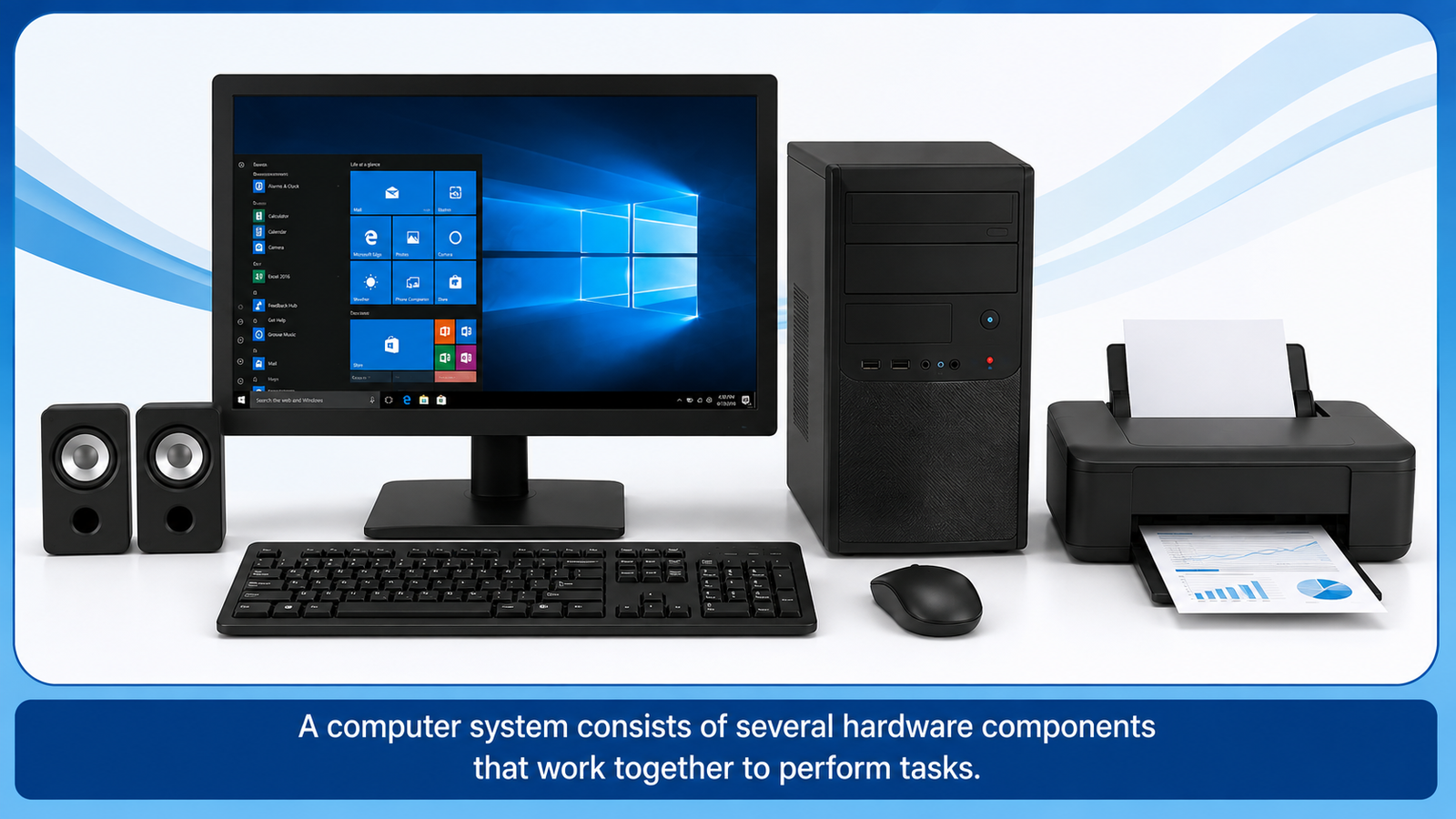
- Monitor
- Printer
- Speaker
- Headphones
- Projector
- Plotter
1. Monitor
Monitor सबसे common output devices में से एक है।
यह computer द्वारा processed information को screen पर दिखाता है।
Monitor पर हम:
- Text
- Images
- Videos
- Websites
- Applications
- Graphics
देख सकते हैं।
Monitor को कभी-कभी VDU — Visual Display Unit भी कहा जाता है।
Monitor के प्रकार
कुछ common monitor technologies हैं:
LCD
Liquid Crystal Display technology पर आधारित।
LED
आमतौर पर LED-backlit LCD displays को सामान्य रूप से LED monitors कहा जाता है।
OLED
एक अलग display technology जिसमें individual pixels स्वयं light emit करते हैं।
2. Printer
Printer computer में मौजूद digital information को physical paper पर print करने के लिए उपयोग किया जाता है।
Printer से प्राप्त printed result को Hard Copy कहा जाता है।
Printer के प्रकार
Inkjet Printer
Ink को छोटे droplets के रूप में paper पर print करता है।
यह photos और color documents के लिए commonly used है।
Laser Printer
Laser और toner technology का उपयोग करता है।
यह तेज और high-volume document printing के लिए उपयोगी है।
3. Speaker
Speaker audio output देने वाला device है।
इससे हम computer की sound सुन सकते हैं।
Examples:
- Music
- Video sound
- Notifications
- Voice
- Online classes
4. Headphones
Headphones भी audio output device हैं।
इनका उपयोग audio को व्यक्तिगत रूप से सुनने के लिए किया जाता है।
Online classes, meetings, music और videos में headphones बहुत उपयोगी होते हैं।
5. Projector
Projector computer की screen या presentation को बड़ी surface जैसे wall या projection screen पर display करता है।
इसका उपयोग:
- Classrooms
- Meetings
- Training
- Presentations
- Conferences
में किया जाता है।
6. Plotter
Plotter एक specialized output device है जिसका उपयोग large-size technical drawings और graphics तैयार करने के लिए किया जाता है।
इसका उपयोग engineering, architecture और technical designing जैसे क्षेत्रों में किया जा सकता है।
Soft Copy और Hard Copy
Computer output को broadly दो forms में समझा जा सकता है।
Soft Copy
Digital form में मौजूद information को soft copy कहा जाता है।
Examples:
- PDF file
- Word document
- Digital image
- Video
Hard Copy
Information का printed physical form hard copy कहलाता है।
Example:
Paper पर printed document।
Input और Output Devices में अंतर
| Input Device | Output Device |
|---|---|
| Computer में data enter करता है | Computer से result देता है |
| User से information लेता है | User को information देता है |
| Keyboard इसका example है | Monitor इसका example है |
| Mouse इसका example है | Printer इसका example है |
| Scanner इसका example है | Speaker इसका example है |
Input → Processing → Output
Computer का basic working flow:
Input
Keyboard से data enter किया।
↓
Processing
CPU ने instructions को process किया।
↓
Output
Monitor ने result display किया।
यदि result को paper पर print किया जाए, तो printer hard copy output प्रदान करता है।
Output Devices का उपयोग
| Device | मुख्य उपयोग |
|---|---|
| Monitor | Visual information display |
| Printer | Documents print करना |
| Speaker | Audio output |
| Headphones | Personal audio |
| Projector | Large-screen display |
| Plotter | Technical और large drawings |
याद रखने योग्य बातें
- Output computer द्वारा processing के बाद प्राप्त result है।
- Monitor एक common output device है।
- Printer digital information को paper पर print करता है।
- Printed document को Hard Copy कहा जाता है।
- Digital document को Soft Copy कहा जाता है।
- Speaker और Headphones audio output देते हैं।
- Projector computer display को बड़ी screen या surface पर दिखाता है।
- Plotter technical और large-size drawings के लिए उपयोग किया जा सकता है।
Lesson Summary
इस lesson में हमने Output Devices के बारे में जाना। Monitor, Printer, Speaker, Headphones, Projector और Plotter computer के प्रमुख output devices हैं। ये devices processed information को text, image, video, audio या printed form में user तक पहुँचाते हैं।
SNCEC PORTAL
Student & Website Links
Quick access to student services, courses, learning resources and SNCEC information.
Student Login
Access your student account
Student Registration
Create your student account
Student Dashboard
Manage your learning activities
Courses
Explore our job-oriented courses
All Courses List
View complete course catalog
Instructor Registration
Join us as an instructor
Our Team
Meet our professional team
About Us
Learn more about SNCEC
Contact Us
Get in touch with our team
Mock Tests & Quizzes
Practice and test your knowledge
Student Zone
Access student services and resources
Student Zone →Learning Portal
Access online learning resources
Open Portal →Computer Shop
Computers, accessories & IT products
SNCEC Official Website
Shree Narayan Computers & Education Center